What items and components are licensed, and what components are free?
You need a license for each of the following parts:
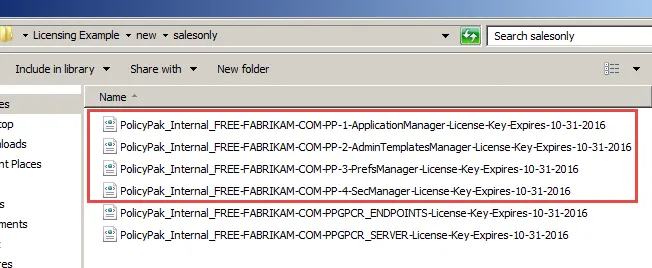
For Netwrix PolicyPak: All Components need a license to be downloaded on endpoints in order to process PolicyPak components / instructions from components such as:
- PolicyPak Application Manager
- PolicyPak Admin Templates Manager
- PolicyPak Preferences Manager and
- PolicyPak Security Settings Manager data.
- PolicyPak File Associations Manager
- PolicyPak Browser Router
- PolicyPak Least Privilege Manager
- PolicyPak Java Rules Manager
- PolicyPak Start Screen & Taskbar Manager
- PolicyPak Scripts Manager
Those license files look like this:
For PP Group Policy Compliance Reporter:
-
Reports for free: All PolicyPak Components like:
- PP Application Settings Manager,
- PolicyPak Admin Templates Manager, and
- PolicyPak Browser Router).
-
Reports which are required for be PAID:
- Microsoft Group Policy Admin Templates
- Microsoft Group Policy Preferences
- Microsoft Group Policy Security
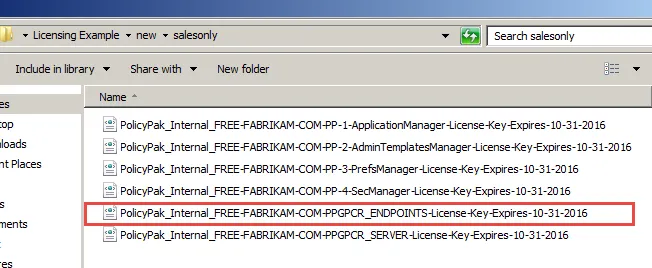
To enable PPGPCR Endpoints for Microsoft items, this is the right license:
Also note what is not required to be licensed:
Step 1 – Admin Stations
- You do not need a license for anywhere the GPMC is running / editing / creating GPOS.
- You do not need a license for anywhere the PolicyPak Group Policy Compliance Reporter Admin Station (Client) is running.
Step 2 – Again: You don't need a license for endpoints to use GP Compliance Reporter to report on PolicyPak -delivered specific component items. This is automatically licensed.
Remember, you do need a PP Compliance Reporter Endpoint license if you want to report on Microsoft Group Policy item types like Group Policy Security Settings.
Step 3 – PP Compliance Reporter server is no longer licensed. Only PP Compliance Reporter endpoints are licensed.
Step 4 – None of the PP Support tools like the PolicyPak Application Manager Design Studio, Powershell add-ins, or GPOTouch utility need to be licensed.
To generate license request keys for PolicyPak On-Prem suite endpoints see the Knowledge Base fort additional information.
Once you acquire licenses from our sales team, you can implement them in two ways. See PolicyPak Solution Methods: Group Policy, MDM, UEM Tools, and PolicyPak Cloud compared. for additional information on how to import the licenses.