Change the Built-In Admin Password
Summary
This article outlines how to change the password of Netwrix Privilege Secure's built-in Admin account.
Instructions
-
Sign in to Netwrix Privilege Secure using the Admin account.

-
IMPORTANT: The
Domainfield must be set to"<none>"in order to log in with the built-in Admin account. -
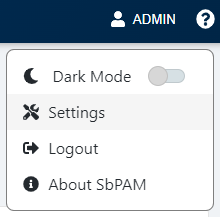
In the upper-right of the page, click Admin and then Settings.
-
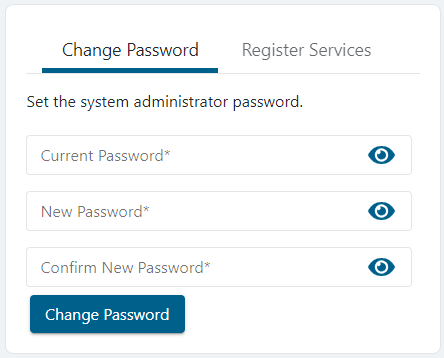
The Change Password menu appears on the page and can be used to set a new password for the built-in Admin account.
-
If the password change is successful, you are immediately logged out of Netwrix Privilege Secure and presented with the log-in page.
IMPORTANT: Previously used passwords cannot be used and will result in an error when attempting to change the password.