Services Are Not Running
Summary
If Netwrix Privilege Secure services are down, you will receive a warning at the top of the user interface. This article outlines steps that you can take to bring Netwrix Privilege Secure services back online.

Instructions
If a warning appears at the top of the Netwrix Privilege Secure interface stating a service is offline, take the following steps to attempt to bring the affected service back online.
-
Check the services on the server
-
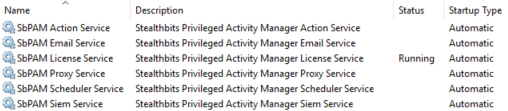
Open Windows Services and verify whether any Netwrix Privilege Secure services are not running.
-
Example screenshot:
-
If any services are not running, start them using the Windows Services interface or run the following in an elevated PowerShell:
Start-Service sbpam* -
In this instance 1 out of the 5 services are running, so you can manually start the services by opening
services.mscon the local Netwrix Privilege Secure server.
-
-
Re-register services in the web UI (if services are running but the UI still shows a warning)
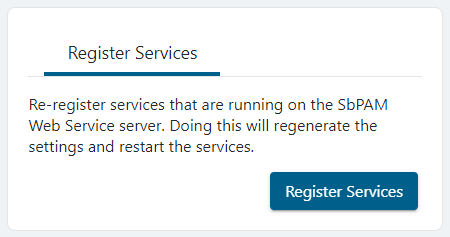
- If all Netwrix Privilege Secure services are running in Windows Services yet there's still a services warning in the Netwrix Privilege Secure web application interface, re-register the services with Netwrix Privilege Secure.
- Log in to Netwrix Privilege Secure's web application as an Admin.
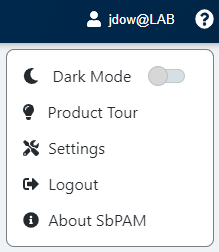
- In the upper-right, click the current logged-in user's name, then click Settings, and then click Register Services.
-
If issues persist
- Gather Netwrix Privilege Secure's logs by following the steps in this article: https://kb.netwrix.com/5874
- Contact Netwrix Support: https://www.netwrix.com/support.html
If issues continue after these steps, provide the gathered logs to Netwrix Support for further assistance.