Operational Maintenance
Operational Maintenance
Operational Maintenance
Once Privilege Secure is deployed, perform the following maintenance and operational tasks at regular intervals:
Privilege Secure Processes (suggested daily)
- The Privilege Secure processes can be listed using the following command:
- s1 status; s1 nodes
- This lists the status of all containers in the docker environment for Privilege Secure. They should all be scaled to 1/1 in a production environment. All nodes should be listed
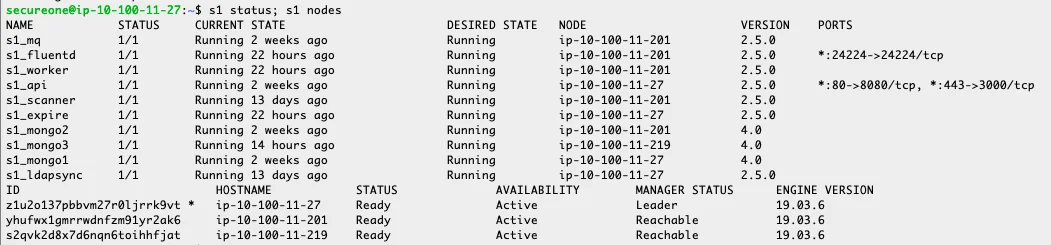
- The manager status shows "Leader" for a single node or "Leader" and "Reachable" for a cluster. The Leader is the primary manager node and the Reachable nodes are managers. In the event of a failure of a node an election to determine a new primary manager takes place. A single node can fail without any indication to users.
Disk Maintenance (suggested weekly)
- Check disk space periodically. The command is: df -h
- This command is disk free with the switch h for human readable. Investigate disk usage over 80% for specific causes of excessive usage. If the space can't be reduced successfully, add additional disk space. The Customer Success team can assist with the review and reduction of used disc space and also increase of disk space (physical or virtual, dependent on environment).
Backups
Review (suggested weekly)
- Check that backups are running on the production node and copying successfully to DR.
- Confirm that backups with appropriate recent date exist on DR server. A cron script typically runs backups daily.
- If the backup is set to restore the database backup daily, check the logs for any errors.
- Production Primary Node:
- ls -lath /secureone/data/db/backups
- DR Primary Node:
- ls -lath /secureone/data/db/restore
Test (suggested minimum yearly)
-
Test DR at least yearly. This can be part of a wider DR test or specific to Privilege Secure.
-
Create a test window, since changes to Privilege Secure DR don't propagate back to the main production instance.
-
After a test ensure that services are down on the DR node. This will avoid the DR environment overriding changes from Production. Use the following command:
s1 stop expire worker scanner
Run Quickstart to Review Protect Mode and Persistence (suggested weekly)
- Run Quickstart frequently to ensure that all machines remain in protect mode. Filter the Quickstart output for any machines that don't show in protect mode. This ensures that the build process and addition of protect mode runs as expected.
- Quickstart can also be used for a review of persistent access. This should be minimized to service accounts. A review to look for user accounts set to persistent should be performed. If these are truly required to be persistent, then they should be switched to a service account.
Privilege Secure Log Review - SIEM (suggested weekly)
- Typically, a SIEM solution best reports issues that Privilege Secure logs capture.
- For Splunk query examples, see Splunk and SIEM Queries.
- Review the "change system policy" output for any removal of protect mode.
- The "slow JITA access" and "time it takes for JITA access" indicate whether users experience slow privilege elevation when using Privilege Secure.
Mongo Health (suggested weekly)
Time Sync
- Run the following command to check that servers remain in sync:
- sudo docker exec -it $(sudo docker ps | grep mongo | cut -d' ' -f1) mongo SecureONE --eval 'rs.printSlaveReplicationInfo()'
- The result should show that there is little or no difference in time:
- secureone@ip-10-100-11-27:/secureone/conf/fluentd$ sudo docker exec -it $(sudo docker ps | grep mongo | cut -d' ' -f1) mongo SecureONE --eval 'rs.printSlaveReplicationInfo()' MongoDB shell version v4.0.20 connecting to: mongodb://127.0.0.1:27017/SecureONE?gssapiServiceName=mongodb Implicit session: session { "id" : UUID("dcab2535-4051-48df-80fd-eec1136f692b") } MongoDB server version: 4.0.20 source: mongo2:27017 syncedTo: Tue Sep 22 2020 16:03:34 GMT+0000 (UTC) 0 secs (0 hrs) behind the primary source: mongo3:27017 syncedTo: Tue Sep 22 2020 16:03:34 GMT+0000 (UTC) 0 secs (0 hrs) behind the primary
- If there is a variation in time, contact the Remediant Customer Success team.
Mongo status
- Run the following to ensure the mongo DB nodes are maintaining the correct state:
sudo docker exec -it $(sudo docker ps | grep mongo | cut -d' ' -f1) mongo SecureONE --eval 'rs.status()' | grep "name\|health\|state\|stateStr"
- The output of this should be
"name" : "mongo1:27017",
"health" : 1,
"state" : 1,
"stateStr" : "PRIMARY",
"name" : "mongo2:27017",
"health" : 1,
"state" : 2,
"stateStr" : "SECONDARY",
"name" : "mongo3:27017",
"health" : 1,
"state" : 2,
"stateStr" : "SECONDARY",
NOTE: Health should report as 1 for everything and state should be 1 or 2.
Version and OS updates (suggested quarterly minimum)
- Ensure quarterly meeting to review updates to Privilege Secure version and OS patches/updates.
- Patches can be applied monthly. The Customer Success team can be contacted before updates to ensure no known issues.
See also: Docker Credentials Helper — secure credential storage for pulling private registry images during NPSD deployment and upgrades.