Forward Logs to Syslog Servers and SIEM Solutions
Forward Logs to Syslog Servers and SIEM Solutions
Forward Logs to Syslog Servers and SIEM Solutions
This topic covers forwarding Privilege Secure application logs to a syslog server or Security Information and Event Management (SIEM) solutions, such as:
- LogRhythm
- SolarWinds
- HP ArcSight
- IBM QRadar
- AlienVault
See the Splunk and SIEM Queries topic for additional information.
Prerequisites
- Netwrix Privilege Secure for Discovery 2.8+ or s1_fluentd service using fluentd version 1+
- Syslog collector, either syslog server or SIEM
NOTE: Privilege Secure versions before 2.8 will require the fluentd service to be upgraded to version 1. The default fluentd included with Privilege Secure before 2.8 use a version of fluentd that truncates logs at 1kB.
Fluent.conf
Backup config:
- sudo cp /secureone/conf/fluentd/fluent.conf /secureone/conf/fluentd/fluent.conf.`date +%Y.%m.%d
Edited config:
- sudo vim /secureone/conf/fluentd/fluent.conf
Edit the match docker.** section. See the following example. Mind the indents, alter IP, port, and tag as necessary. File example contents:
#fluent.conf for fluentd version 1
<source>
  @type forward
</source>
<filter docker.**>
  @type parser
  time_key key3
  format json
  key_name log
  reserve_data true
</filter>
<match docker.**>
  @type copy
  <store>
    @type remote_syslog
    host 10.100.11.13
    port 514
    protocol tcp
    packet_size 4096
    #program can ingest as tag, etc.
    program secureone
    # hostname in the syslog header - defaults to the host server's hostname.
    # Override by setting S1_NODE_HOSTNAME on the host (see Hostname Configuration below).
    hostname "#{ENV['S1_NODE_HOSTNAME'] || Socket.gethostname}"
    ## TLS options
    # tls <true or false>
    # ca_file <path to CA cert bundle>
    # verify_mode 0 # no certificate required
    # verify_mode 1 # certificate optional
    # verify_mode 2 # certificate required
    # Memory buffer with a short flush internal.
    # <buffer>
    #   flush_mode interval
    #   flush_interval 1
    # </buffer>
    <format>
      @type single_value
      message_key log
    </format>
  </store>
  <store>
    @type stdout_pp
    pp true
    time_color blue
    tag_color yellow
    record_colored true
  </store>
</match>
<match **>
  @type stdout_pp
  pp true
  time_color blue
  tag_color yellow
  record_colored true
</match>
Relaunch fleuntd to load the new configuration:
- s1 restart fluentd
How-to check fluentd version and running configuration, SSH to node running fluentd:
- sudo docker exec -it $(sudo docker ps | grep fluentd | cut -d' ' -f1) fluent-gem list | grep fluentd
Command to check fluent.conf running on current fluentd service:
- sudo docker exec -it $(sudo docker ps | grep fluentd | cut -d' ' -f1) fluentd -c /fluentd/etc/fluent.conf --dry-run
Results in SIEM
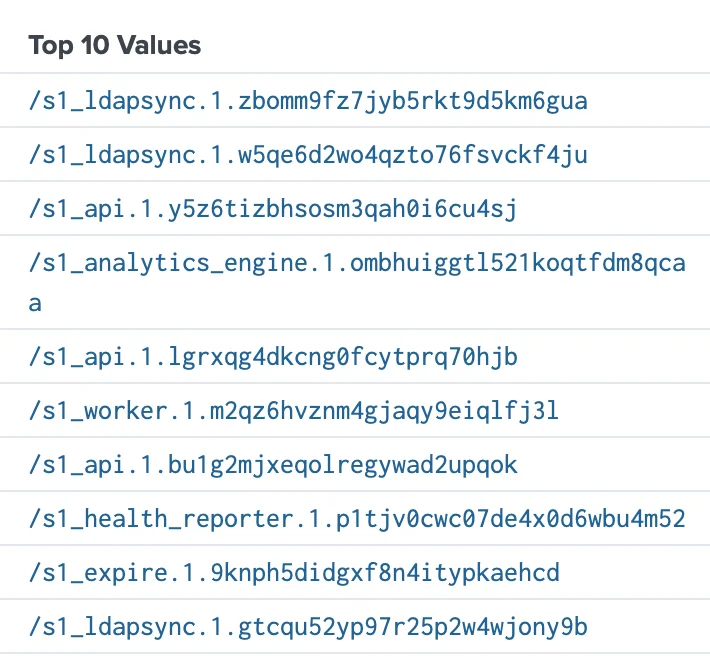
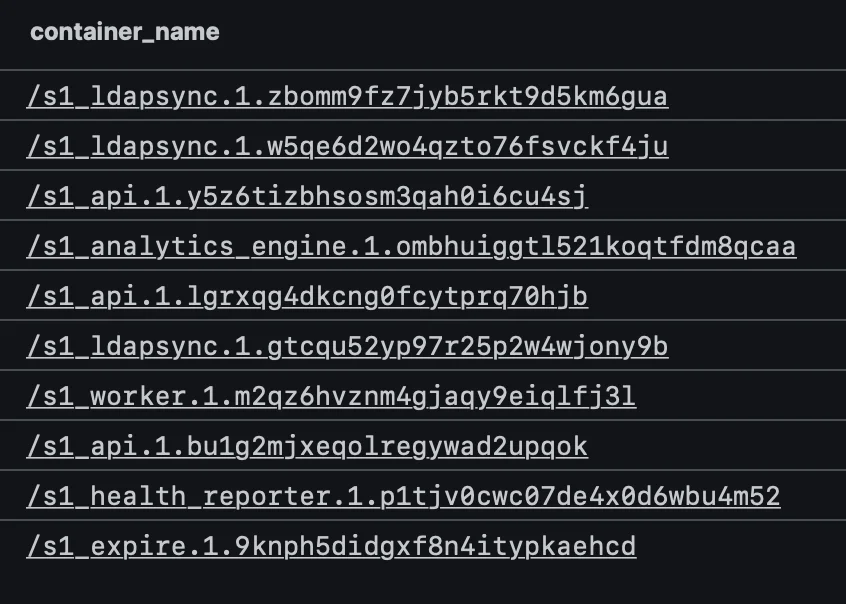
Once log forwarding is setup, the activity for each Privilege Secure's services (api, worker, scanner, ldapsync, analytics_engine, internal_api, health_reporter, and expire) will be forwarded based on the match stanza that includes all Docker services "docker.**" generated.
Example of the services (aka "container_name"), being forward, from different SIEMs:
Splunk
NOTE: This view sort by top 10 values based on event count per "container_name", which is why all the SecureONE listed services aren't displaying.
Humio
Hostname Configuration in Syslog Output
Hostname configuration in syslog output is available in NPS-D 2.22.13, 26.03.1, or later.
By default, NPS-D automatically uses the host server's hostname in the syslog header. Docker Swarm passes the node hostname to the Fluentd container at runtime, so no manual configuration is required in most environments.
Before this change, logs showed a Docker container ID in the hostname field (for example,
a3f2b1c4d5e6), which made SIEM correlation difficult. Logs now show the actual server hostname.
Example syslog output:
<13>Apr 7 11:15:14 secureone secureone: {"asctime": "2026-04-07 11:15:13,669", "levelname": "INFO", "message": "EntraId config processing", "service": "svc-scan", ...}
The syslog header fields map as follows:
| Field | Value | Notes |
|---|---|---|
hostname | secureone | Host server hostname, set automatically |
program | secureone | Fixed value declared in fluent.conf |
| Log body | JSON object | Full structured log from the NPS-D service |
Override the Hostname
To use a custom hostname or IP address instead of the auto-detected value, set the
S1_NODE_HOSTNAME environment variable on the host before starting the Docker Swarm:
export S1_NODE_HOSTNAME=my-custom-hostname-or-ip
The Fluentd configuration resolves the hostname in this order:
S1_NODE_HOSTNAMEenvironment variable — if set, this value is usedSocket.gethostname— falls back to the OS hostname of the node
This is the relevant directive in fluent.conf:
hostname "#{ENV['S1_NODE_HOSTNAME'] || Socket.gethostname}"
Troubleshooting
-
Splunk – Send a test log to Splunk HTTP Event Collector (HEC). Change IP, port, and token for Splunk HEC:
-
curl -k "https://10.11.12.13:8088/services/collector" -H "Authorization: Splunk
<token>" -d '{"event": "PrivilegeSecure Test Log"}'; echo-
Alternate test with json formatting and verbose output:
- curl "https://10.100.11.13:8088/services/collector" -H "Authorization: Splunk
<token>" -d '{"event": {"msg":"PrivilegeSecure Test Log"}}' -v
- curl "https://10.100.11.13:8088/services/collector" -H "Authorization: Splunk
-
-
-
Syslog – Send a test log to a syslog server. Change IP and port to match syslog server.
- echo '
<14>source PrivilegeSecure: this is a syslog test' | nc -v -u -w 0 10.11.12.13 514
- echo '
-
tcpdump – Example to verify logs flowing out, monitor traffic on port 514 for any adapter, 'any' can be change to a specific adapter:
-
sudo tcpdump -vv -i any port 514
-
Alternative tcpdump example, 'any' can be change to a specific adapter:
-
sudo tcpdump -n -e -q -i any dst 10.100.11.13
- -n=no dns lookup; -e=link-level header; -q=quiet (less protocol info); -i=interface; dst=destination
-
-
-