Authenticating with an API Key in Postman
Overview
This article describes how to configure Postman to authenticate to the Netwrix Privilege Secure for Discovery API with an API key and store the returned JSON Web Token (JWT) as a global variable.
For the available endpoints, see the Advanced API Reference. To authenticate without Postman, see Authenticate with an API key.
Prerequisites
You need:
- A valid userId
- An API key generated for that user
Instructions
-
Open Postman.
-
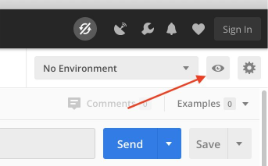
Click the eye icon in the upper-right corner.
-
Click Edit next to Globals.
-
Add the following variables:
-
api_key
- Initial Value:
<api-key> - Current Value:
<api-key>
- Initial Value:
-
(Optional) base_url
- Enter the URL of your environment if required.
-
-
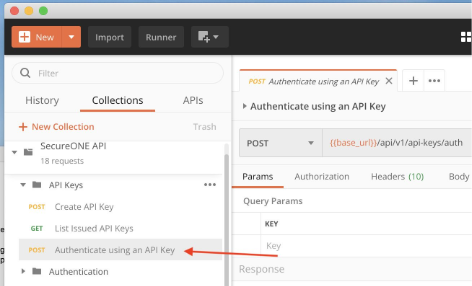
Go to the API collection, expand API Keys, and select Authenticate using an API key.
-
Click the Body tab and enter the userId associated with the API key.
NOTE:
{{api_key}}automatically pulls from the global variable. -
Click the Tests tab.
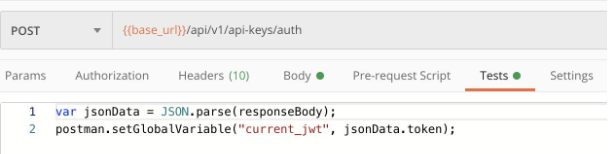
Paste the following:
var jsonData = JSON.parse(responseBody);postman.setGlobalVariable("current_jwt", jsonData.token); -
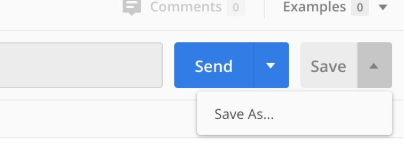
Click Save, or use Save As to store it separately.
-
Click Send and verify the response appears at the bottom. You should receive a token in the response.
-
Send GET and POST requests that use the stored
current_jwttoken.
IMPORTANT: The authentication token expires every 8 hours. Run the Authenticate using an API key request again to refresh it.