SIEM Page
The SIEM page provides configuration settings for forwarding threat information to a SIEM service such as QRadar or Splunk. Before configuring this page, determine the IP address and Port for the SIEM server.
Follow the instructions to enable SIEM notifications.
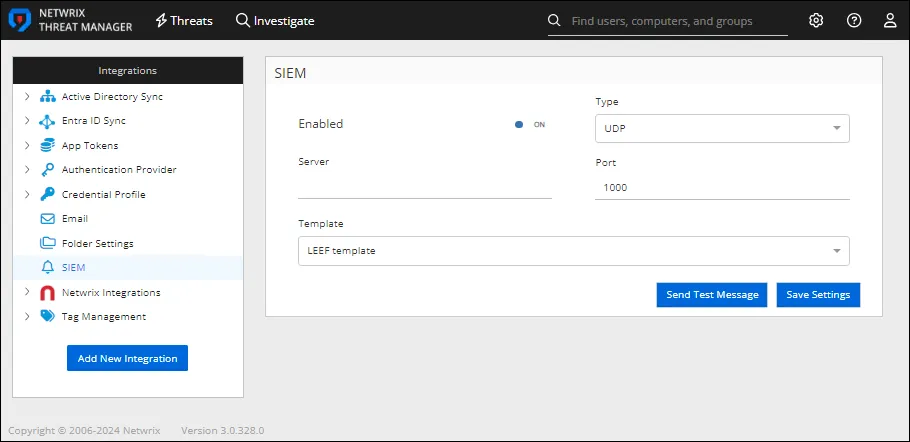
Step 1 – In the Integrations box, click SIEM. The SIEM window opens.
Step 2 – Enter the following information:
-
Enabled – Sends threat configuration settings to the configured SIEM service if set to ON. The default is ON.
-
Server – The IP address of the SIEM server. This field is blank and turned off by default.
-
Type – Select a protocol type from the dropdown to use when sending a Syslog message to a SIEM application:
- UDP
- TCP
-
Port – The port of the SIEM server.
-
Template – Select the template you want from the dropdown
-
LEEF template – Sends threat data to the SIEM application in the standard Log Event Extended Format (LEEF) format
-
CEF template – Sends threat data to the SIEM application in the standard Common Event Format (CEF) format
-
Custom template – Sends threat data to the SIEM application in a customized format
noteOnly one custom template can be implemented.
-
Notification template – Sends threat data to the SIEM application in a basic notification format:
%SYSLOG_DATE%|%HOST%|%COMPANY%|%PRODUCT%|%PRODUCT_VERSION%|%MESSAGE_TYPE%|%MESSAGE% -
-
Template Format – Selecting Custom template from the Template dropdown enables this box. Use it to create a custom SIEM template with the variables available in Threat Manager:
All template variables are case-insensitive and wrapped in
%delimiters (e.g.,%VARIABLE_NAME%). The template replaces unresolved variables with an empty string.General Variables
Variable Description Data Type Example Value %SYSLOG_DATE%Current UTC date/time in universal sortable format string(DateTime formatu)2026-03-03 14:30:00Z%SYSLOG_DATE_ISO%Current UTC date/time in ISO 8601 format with milliseconds string(DateTime formatyyyy-MM-ddTHH:mm:ss.fffZ)2026-03-03T14:30:00.123Z%SYSLOG_DATE_ISO_D%Current UTC date/time in compact ISO 8601 format with milliseconds string(DateTime formatyyyyMMddTHH:mm:ss.fffZ)20260303T14:30:00.123Z%HOST%Machine name of the Netwrix Threat Manager server stringNTM-SERVER01%COMPANY%Company name from application info stringNetwrix Corporation%PRODUCT%Product name from application info stringNetwrix Threat Manager%PRODUCT_VERSION%Product version from application info string4.5.0.0%THREAT_TYPE_ID%Job ID of the threat definition string(fromlong)42%THREAT_TIME%UTC time of the primary event in universal sortable format string(DateTime formatu)2026-03-03 14:25:00Z%THREAT_TYPE%Job type / threat category name stringAbnormal Authentication%THREAT_LEVEL%Numeric threat severity level ID (-1 if null) string(fromlong)3%PERMISSION_DIFF%Formatted permission difference for the primary event (syslog format) string(Structured permission change details) %USERS%SAM account name of the perpetrating user stringDOMAIN\jsmith%COMPUTERS%Semicolon-delimited list of computers involved in the threat stringSERVER01; WORKSTATION02%FILENAME%File or share name from the primary event (prefers share name over file name) string\\SERVER01\SharedDocs%NEW_FILENAME%New attribute value from the primary event (e.g., renamed file) string\\SERVER01\NewFolder%PROCESS%Process name from the primary event stringexplorer.exePerpetrator
Variable Description Data Type Example Value %PERPETRATORSAMACCOUNTNAME%NT Account Name of the perpetrator stringDOMAIN\jsmith%PERPETRATORDISTINGUISHEDNAME%Distinguished name of the perpetrator stringCN=John Smith,OU=Users,DC=domain,DC=com%PERPETRATORDOMAIN%Domain of the perpetrator stringDOMAIN%PERPETRATORTAGS%Comma-delimited list of tags assigned to the perpetrator stringVIP, Executive, Service Account%THREATUSERDISPLAYNAME%Display name of the threat user (falls back to NT Account Name) stringJohn Smith%THREATUSEREMAIL%Email address of the threat user stringjsmith@domain.com%THREATUSERMANAGERDISPLAYNAME%Display name of the threat user's manager (falls back to manager NT Account Name) stringJane Doe%THREATUSERMANAGEREMAIL%Email address of the threat user's manager stringjdoe@domain.comClient
Variable Description Data Type Example Value %CLIENTDOMAIN%Domain name of the client host stringDOMAIN%CLIENTTAGS%Comma-delimited list of tags assigned to the client host stringWorkstation, FinanceTarget Host
Variable Description Data Type Example Value %TARGETHOSTDOMAIN%Domain name of the target host stringDOMAIN%TARGETHOSTTAGS%Comma-delimited list of tags assigned to the target host stringDomain Controller, CriticalAffected User
This is a unique list of users from all events associated with the threat. The object types are always users.Variable Description Data Type Example Value %AFFECTEDUSERSAMACCOUNTNAME%Comma-delimited list of affected user NT Account Names stringDOMAIN\user1, DOMAIN\user2%AFFECTEDUSERDISPLAYNAME%Comma-delimited list of affected user display names (falls back to SAM account name) stringUser One, User Two%AFFECTEDUSERDOMAIN%Domain of the first affected user (parsed from SAM account name or AD domain) stringDOMAIN%AFFECTEDUSERTAGS%Comma-delimited, deduplicated list of tags across all affected users (includes group tags) stringVIP, AdminsPrimary Event
The primary event is the event that initially triggered the threat.Variable Description Data Type Example Value %PRIMARYEVENTCLIENT%Client name from the primary event (could be Domain\Computer, FQDN, or (unknown) IPAddress) stringDOMAIN\WORKSTATION01%PRIMARYEVENTCLIENTID%NTM ID of the client on the primary event. This value is internal to Threat Manager long1234%PRIMARYEVENTCLIENTIP%IP address of the client on the primary event string192.168.1.100%PRIMARYEVENTFROMIP%IP address of the originating client (alias for client IP) string192.168.1.100%PRIMARYEVENTFROMMAC%MAC address of the originating client string00:1A:2B:3C:4D:5E%PRIMARYEVENTTOIP%IP address of the target host for the primary event string10.0.0.50%PRIMARYEVENTHOST%Source host name from the primary event stringDOMAIN\SERVER01%PRIMARYEVENTDOMAIN%Domain name of the primary event source host stringDOMAIN%PRIMARYEVENTOPERATION%Category/type of operation for the primary event stringFile Modified%PRIMARYEVENTPATH%File path from the primary event (falls back to share name) string\\SERVER01\Share\Documents\file.docxPrimary Event Affected Object
Variable Description Data Type Example Value %PRIMARYEVENTAFFECTEDOBJECTSAMACCOUNTNAME%SAM account name of the affected object on the primary event stringsvc-backup%PRIMARYEVENTAFFECTEDOBJECTDISTINGUISHEDNAME%Distinguished name of the affected object on the primary event stringCN=svc-backup,OU=Service Accounts,DC=domain,DC=com%PRIMARYEVENTAFFECTEDOBJECTSID%SID of the affected object on the primary event stringS-1-5-21-123456789-987654321-111111111-1234%PRIMARYEVENTAFFECTEDOBJECTGUID%GUID of the affected object on the primary event stringa1b2c3d4-e5f6-7890-abcd-ef1234567890%PRIMARYEVENTAFFECTEDOBJECTCLASS%Object class of the affected object on the primary event stringuser%PRIMARYEVENTAFFECTEDOBJECTDOMAIN%Domain of the affected object on the primary event stringdomain.comThreat Metadata
Variable Description Data Type Example Value %THREATID%Unique ID of the threat long98765%THREATTYPE%Type/category of the threat (from Job.JobType) stringAbnormal Authentication%THREATLEVEL%Severity level name of the threat stringHigh%THREATDEFINITION%Description of the threat definition (from Job.ThreatDescription) stringDetects abnormal authentication patterns%THREATSUMMARY%Formatted summary/description of the threat stringUser jsmith authenticated from an unusual location%THREATPROPERTIES%Raw JSON string of the threat properties string(JSON){"key":"value"}%THREATEVENTCOUNT%Number of events associated with the threat int15%THREATPROCESSNAME%Name of the process from the primary event stringpowershell.exe%THREATTIMEGENERATED%Full date/time when the threat was detected DateTime03/03/2026 2:30:00 PM%THREATTIMEGENERATEDDATE%Date when the threat was detected (long date format) string(DateTime formatD)Tuesday, March 3, 2026%THREATTIMEGENERATEDTIME%Time when the threat was detected in UTC (short time format) string(DateTime formatt)2:30 PMEvidence
Variable Description Data Type Example Value %THREATEVIDENCE%JSON-serialized array of visible evidence items string(JSON)[{"Description":"Logon from unusual IP","Show":true}]%EVIDENCE%Semicolon-delimited string of evidence descriptions stringLogon from unusual IP; Account used outside business hoursSpecial Characters
The template also processes special characters:
Sequence Replacement Description \t(literal)Tab character The template converts tab characters to actual tabs \r\\rThe template escapes carriage returns in the output \n\\nThe template escapes newlines in the output The template appends
\r\nto every message.
Step 3 – Click Send Test Message to send a test email to the configured email address.
Step 4 – Click Save Settings to save the configuration settings.
SIEM notifications are now configured.