.NET Dependencies for Netwrix Threat Manager
Related Query
- ".NET on the Netwrix application server is End-Of-Life (EOL). Is it safe to remove it?"
Question
Which version of .NET is required for Netwrix Threat Manager?
Answer
Netwrix Threat Manager requires ASP.NET Core 8.0.11 (or newer) and .NET Desktop Runtime 8.0.11 (or newer). See also Netwrix Threat Manager Requirements in Getting Started.
note
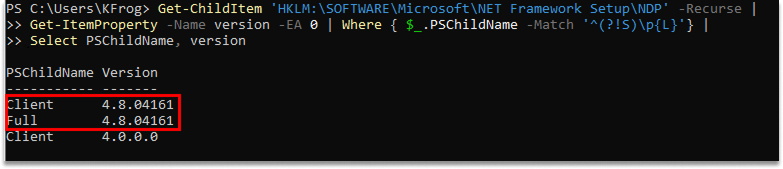
.NET Framework and ASP.NET Core are separate components — installing one does not install the other. ASP.NET Core and .NET Desktop Runtime appear in the list of installed Apps & features. .NET Framework does not appear on that list. You can check which versions of .NET Framework you have installed by running the following command in PowerShell:
Get-ChildItem 'HKLM:\SOFTWARE\Microsoft\NET Framework Setup\NDP' -Recurse |
    Get-ItemProperty -Name version -EA 0 | Where { $_.PSChildName -Match '^(?!S)\p{L}'} |
    Select PSChildName, version
Example: