Test Connection in Active Directory Sync Integration Fails
Symptoms
The following symptoms are present in affected environments:
- In Netwrix Threat Manager (NTM), the test connection fails when you attempt to configure the Active Directory Sync Integration.
- The Threat Manager Console is configured to use the HTTPS protocol.
Cause
The Active Directory Service is misconfigured and cannot be connected to via HTTPS.
Resolution
Edit the Active Directory Service configuration to use the HTTPS protocol:
-
Go to the Web Service folder and locate the
appsettings.jsonfile. The default location is:C:\Program Files\Stealthbits\StealthDEFEND\WebService -
Locate the
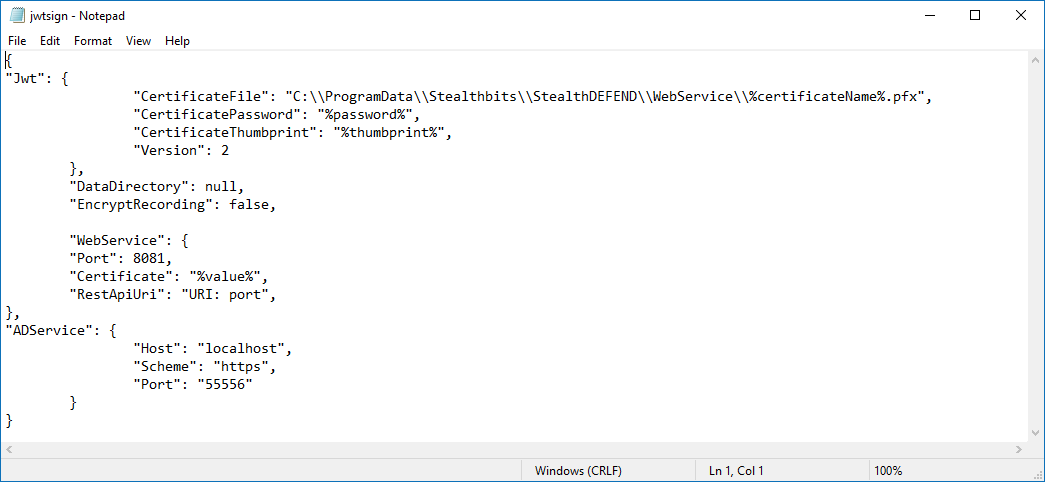
"ADService"node and change theSchemevalue tohttps. For example:"ADService": {"Host": "localhost","Scheme": "https","Port": "55556"}, -
Locate or create the
JWTnode. Specify the relevant certificate values. For example:"Jwt": {"CertificateFile": "C:\\ProgramData\\Stealthbits\\StealthDEFEND\\WebService\\%certificateName%.pfx","CertificatePassword": "%password%","CertificateThumbprint": "%thumbprint%","Version": 2}, -
Save the changes.
Example appsettings.json file: