Installation
Before installing Threat Manager, ensure that all of the prerequisites have been met in accordance with the Requirements topic. Additionally, the monitoring agents need to be deployed through either Netwrix Threat Prevention or Netwrix Activity Monitor and configured to send data to Threat Manager.
The Threat Manager installer is packaged with four executable files.
The PostgreSQL database must be installed before installing Threat Manager.
Netwrix_Setup.exe
This executable starts a setup launcher containing buttons to install the PostgreSQL database and the application. The launcher installs these components on the same server. See the installation details for each component in the following sections.
NetwrixPostgreSQL14.exe
This executable is for installing the PostgreSQL 14 database. PostgreSQL 14 will become End-of-Life on November, 2026. Netwrix recommends that you perform the migration procedure before this date.
NetwrixPostgreSQL18.exe
This executable is for installing the PostgreSQL 18 database. This is the latest recommended version and should be used for all installs going forward.
NetwrixThreatManager.exe
This executable is for installing the application and its services:
- Netwrix Threat Manager Action Service
- Netwrix Threat Manager Active Directory Service
- Netwrix Threat Manager Azure Service
- Netwrix Threat Manager Email Service
- Netwrix Threat Manager Event Service
- Netwrix Threat Manager Integration Service
- Netwrix Threat Manager Job Service
- Netwrix Threat Manager License Service
- Netwrix Threat Manager SIEM Service
- Netwrix Threat Manager Web Service
The following prerequisites will be installed if they aren't present:
- .NET 10
- .NET Desktop Runtime 10
- ASP.NET Core 10
- VC++ redist v14.28.29914
NetwrixThreatManager.ActionService.exe
This executable is for installing the Netwrix Threat Manager Action Service on additional servers.
Software Download
Current customers can log in to the Netwrix Customer Portal to download software binaries and license keys for purchased products. See the Customer Portal Access topic for information on how to register for a Customer Portal account.
Antivirus Exclusions for PostgreSQL
If you have any antivirus software installed, you must do the following:
- Exclude all scanning of the PostgreSQL Data Directories
- Exclude the postgres.exe process from all scans
Antivirus software can interfere with PostgreSQL's operation because PostgreSQL requires file access commands in Windows to behave exactly as documented by Microsoft, and many antivirus programs contain errors or accidental behavior changes that cause these commands to misbehave subtly.
This isn't a problem for most programs because they access files in fairly simple ways. Because PostgreSQL is continuously reading from and writing to the same set of files from multiple processes, it tends to trigger programming and design mistakes in antivirus software, particularly problems related to concurrency. Such problems can cause random and unpredictable errors, or even data corruption.
Antivirus software is also likely to dramatically slow down PostgreSQL's operation. For that reason, you should at least exclude postgres.exe and the data directories so the scanner ignores them.
Installation Process
To install the Threat Manager application on a single server:
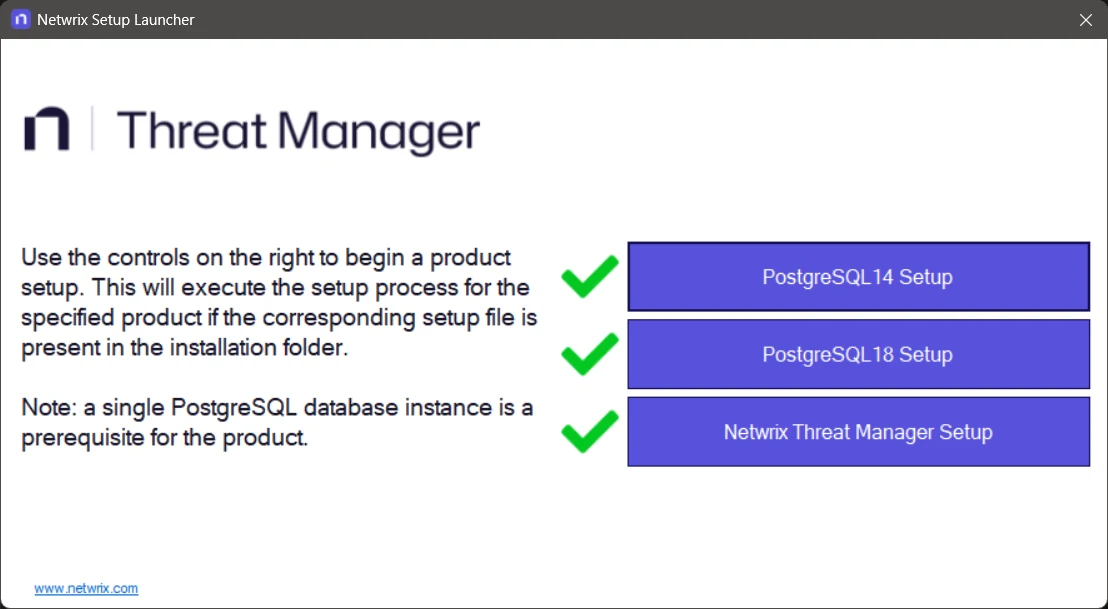
The PostgreSQL 14 button is only displayed if PostgreSQL 14 is already installed on the host. PostgreSQL 18 is the recommended version for new installs.
Step 1 – Right-click Netwrix_Setup.exe and select Run as administrator. The Netwrix Setup
launcher opens. You can now install the following components on the same server:
- Click PostgreSQL Setup to install the database. See the Install the PostgreSQL Database Application topic for additional information.
- Run the Threat Manager Setup to install the application. See the Install the Threat Manager Application topic for additional information.
Step 2 – Complete all post-installation tasks that apply to your configured environment:
- Optional: Install the Action Service on additional servers. See the Optionally Install the Action Service on Additional Servers topic for additional information.
- Configure a remote Action Service to register with Threat Manager.
- Configure a service account to run actions.
Step 3 – Log into the console for the first time. See the First Launch topic for additional information.
Step 4 – Configure integration with one or more Netwrix products to feed the type of data you want into Threat Manager:
- Netwrix Activity Monitor Integration – Configure Netwrix Activity Monitor to send file system data and/or Active Directory data and/or Microsoft Entra ID data to Threat Manager
- Netwrix Threat Prevention Integration – Configure Netwrix Threat Prevention to send Active Directory data to Threat Manager
- Netwrix Access Analyzer (formerly Enterprise Auditor) Integration – Configure Netwrix Access Analyzer (formerly Enterprise Auditor) to send Sensitive Data to Threat Manager