Ports Requirements
The following figure shows Netwrix Threat Manager architecture and component interactions.
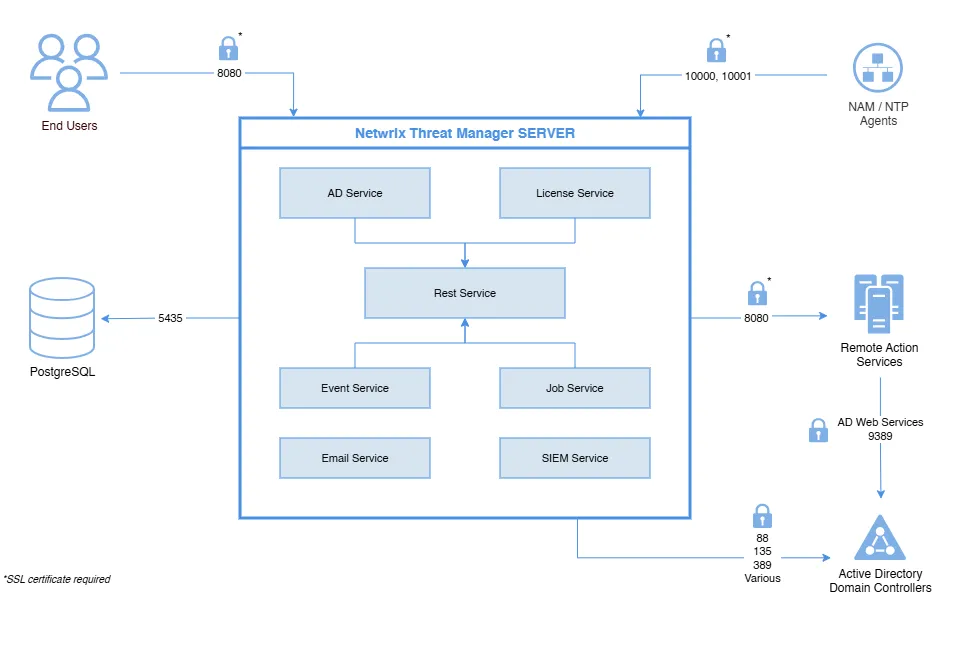
Configure appropriate firewall rules to allow these connections.
Data Stream Firewall Rules
The following firewall settings are required for communication between the Threat Manager server and applications that provide the data stream:
| Communication Direction | Protocol | Ports | Description |
|---|---|---|---|
| Inbound | UDP | 10000 | Syslog messaging File System event data stream from Activity Monitor agent hosts |
| Inbound | TCP | 10001 | Advanced Message Queuing Protocol (AMQP) Active Directory event data stream from Activity Monitor agent hosts Active Directory event data stream from Threat Prevention agent hosts File System event data stream from Threat Prevention agent hosts |
| Bidirectional | TCP | 8080 | Access Analyzer Console Hosts |
Database Firewall Rules
The following firewall settings are required for communication between the Threat Manager server and the database server, when it is installed on a separate server:
These firewall rules are only needed if using a remote PostgreSQL database. That isn't recommended or the default.
| Communication Direction | Protocol | Ports | Description |
|---|---|---|---|
| Outbound | TCP | 5435/5439 | Local Host and Remote communication from the PostgreSQL to the Threat Manager server. |
Application Console Access Firewall Rules
The following firewall settings are required for accessing the Threat Manager console:
| Communication Direction | Protocol | Ports | Description |
|---|---|---|---|
| Bidirectional | TCP | 8080 | Remote access to the application console |
Threat Manager requires the default dynamic port range specified by Microsoft (49152 through 65535) for Windows Server client/server operations. If a firewall or other appliance is blocking these ports, this server will no longer properly respond to client requests and no longer support standard IP Stack operations that are required for the operation of this product.
Active Directory Domain Controllers Firewall Rules
The following firewall settings are required for communication between the Threat Manager server and Active Directory domain controllers:
| Communication Direction | Protocol | Ports | Description |
|---|---|---|---|
| Outbound | TCP | 88 | Kerberos-sec |
| Outbound | TCP | 135 | The endpoint mapper tells the client which randomly assigned port a service (FRS, AD replication, MAPI, etc.) is listening on |
| Outbound | TCP | 389 | LDAP |
| Outbound | TCP | 9389 | Active Directory Web Services |
| Outbound | TCP | Various | The port that 135 reports. Used to bulk translate AD object names between formats.(Ephemeral Ports) |
Remote Action Service Firewall Rules
The following firewall settings are required for communication between the Threat Manager server and the remote Action Service server, when it is installed on additional servers:
| Communication Direction | Protocol | Ports | Description |
|---|---|---|---|
| Outbound | TCP | 8080 | Remote access to the Action Service server |