ADCS Lockdown Event Type
Based on policy rules, the ADCS Lockdown event type can prevent a certificate request in ADCS infrastructure. Every time a request is prevented, an event with details about the prevented requiest is generated.
The event filters for the ADCS Lockdown event type are:
- Domains/Servers
- ADCS Lockdown Attributes
- AD Perpetrator
- Hosts (from)
- Rule Preview
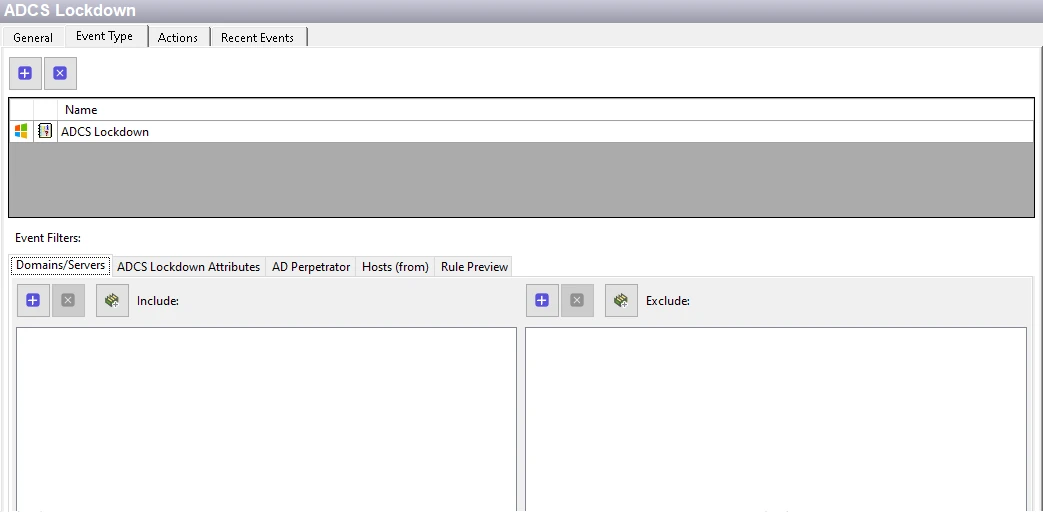
Each filter tab acts like an "AND" statement for the filter. Any filter tab left blank is treated like an "ALL" for that filter set.
Lockdown/blocking policies with blank filters result in everything being locked down or blocked.
Domains/Servers Filter
Use the Domains/Servers filter to set the scope of the policy to specific domains and/or servers or to exclude specific domains and/or servers.

Use the buttons in the Include and Exclude areas to edit the lists.
- The Add (+) buttons open the Select Domains and Servers Window.
- The Collection button opens the List of Collections Window to the appropriate Collection category.
- The Remove (x) button deletes the selected items from that box.
To enable a Dynamic Policy, use the Collection button to select the Dynamic Collection. See the Dynamic Collections topic for additional information.
ADCS Lockdown Attributes Filter
Use the ADCS Lockdown Attributes filter to set the scope of the policy to lockdown requests to specific attributes, or to exclude requests to specific attributes from being locked down.

Select the Block or Allow option button and then edit the list.
Use the buttons in the Attributes area to edit the list.
- The Add (+) button opens the ADCS Attribute List Window.
- The Collection button opens the List of Collections Window to the appropriate Collection category.
- The Remove (x) button deletes the selected items from that box.
AD Perpetrator Filter
Use the AD Perpetrator filter for lockdown to set the scope of the policy to lockdown specific security principals committing changes or to exclude specific security principals committing changes from being locked down.

Select the Block or Allow option button and then edit the list.
For the Password Enforcement Event Type, selecting Allow means that this policy will not validate the new passwords for the accounts listed here. Selecting Block means that this policy will validate the new passwords for the accounts listed here.
Use the buttons in the Perpetrators and Collections of Perpetrators areas to edit the lists.
- Perpetrators area – The Add (+) button opens the Select Active Directory Perpetrators Window.
- Collections of Perpetrators area - The Collection button opens the List of Collections Window to the appropriate Collection category.
- The Remove (x) button deletes the selected items from that box.
To enable a Dynamic Policy, use the Collection button to select the Dynamic Collection. See the Dynamic Collections topic for additional information.
Hosts (from) Filter
Use the Hosts (from) filter for lockdown to set the scope of the policy to only lockdown specific hosts as originators of an event.

Select the Block or Allow option button and then edit the list.
Use the buttons in the Include Hosts area to edit the list.
- The Hosts Add (+) button opens the Select Computer Window.
- The Remove (x) button deletes the selected items from that box.
Rule Preview Filter
The Rule Preview filter displays a summary of the selected filter options. This is primarily used for troubleshooting.
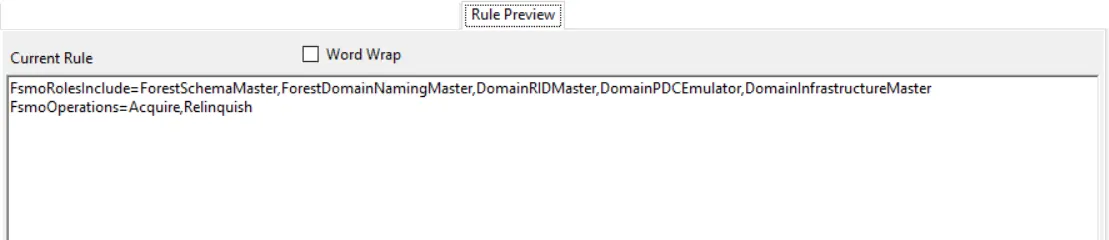
The text displayed represents the rules created based on the policy’s selected filters. Each row is a selected filter. Notice the Word Wrap checkox. If checked, a filter statement may cover multiple rows so that all of it is visible.