Process Guardian – Protect Event Type
Based on policy rules, the Process – Protect event type can prevent processes not ‘white listed’ from accessing LSASS or any other custom process by preventing the Write, Read, Create Thread, Suspend/Resume, Terminate, and/or Create Process operations. An event is generated for each prevented access attempt with details about the process and as it’s attempted versus actual access allowed.
The event filters for the Process Guardian – Protect event type are:
- AD Perpetrator
- Domains/Servers
- Target Processes
- Requesting Processes
- Open Process Flags
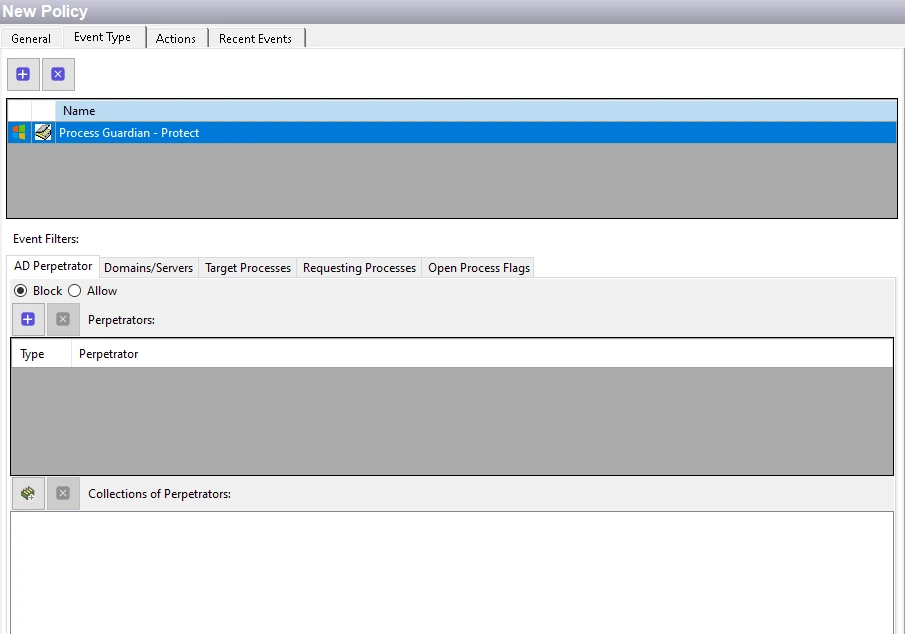
Each filter tab acts like an "AND" statement for the filter. Any filter tab left blank is treated like an "ALL" for that filter set.
Lockdown/blocking policies with blank filters result in everything being locked down or blocked.
AD Perpetrator Filter
Use the AD Perpetrator filter for lockdown to set the scope of the policy to lockdown specific security principals committing changes or to exclude specific security principals committing changes from being locked down.

Select the Block or Allow option button and then edit the list.
Use the buttons in the Perpetrators and Collections of Perpetrators areas to edit the lists.
- Perpetrators area – The Add (+) button opens the Select Active Directory Perpetrators Window.
- Collections of Perpetrators area - The Collection button opens the List of Collections Window to the appropriate Collection category.
- The Remove (x) button deletes the selected items from that box.
To enable a Dynamic Policy, use the Collection button to select the Dynamic Collection you want. See the Dynamic Collections topic for additional information.
Domains/Servers Filter
Use the Domains/Servers filter to set the scope of the policy to specific domains and/or servers or to exclude specific domains and/or servers.

Use the buttons in the Include and Exclude areas to edit the lists.
- The Add (+) buttons open the Select Domains and Servers Window.
- The Collection button opens the List of Collections Window to the appropriate Collection category.
- The Remove (x) button deletes the selected items from that box.
To enable a Dynamic Policy, use the Collection button to select the Dynamic Collection you want. See the Dynamic Collections topic for additional information.
Target Processes Filter
Use the Target Processes filter to set the scope of the policy to lockdown access to the Lsass process or any other process.

- Select Lsass to lockdow Lsass process access.
- Select Custom Process to lockdown any other process access.
For the Custom Process option, enter the process name in the textbox. Use the buttons in the process list area to edit the list.
- The Process Add (+) button adds a textbox to the list to add an additional process.
- The Remove (x) button deletes the selected items from that box.
Requesting Processes Filter
Use the Requesting Processes filter to set the scope of the policy to only lockdown specific processes or exclude specific processes from being locked down.

Select the Block or Allow option button and then edit the list.
Enter the process in the textbox. Use the buttons above the box to edit the list.
- The Add (+) button adds a textbox to the list to add an additional process.
- The Remove (x) button deletes the selected items from that box.
- While you can select to Block processes, it isn't recommended for locking down target process. Adding a process block filter will limit the policy to only block that requesting process. The policy wouldn't block unknown malicious processes.
- While you can select to Allow processes, it is possible that a malicious process could be renamed to the same as an “allowed” process. Therefore, the malicious process wouldn't be blocked.
Open Process Flags Filter
Use the Open Process Flags filter to set the scope of the policy for requested handles that would maliciously impact target process.
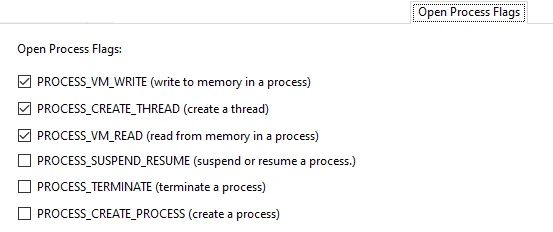
Check the box to select the process flags to be removed from the target process handle that is returned to the requesting process.
- PROCESS_VM_WRITE – Select this checkbox to write to memory in a process
- PROCESS_CREATE_THREAD – Select this checkbox to create a thread
- PROCESS_VM_READ – Select this checkbox to report if the calling process, such as an application,
wants to read process memory
- Among other things, this would prevent the creation of an Process memory dump file by Task Manager or other processes.
- PROCESS_SUSPEND_RESUME – Select this checkbox to suspend or resume a process
- PROCESS_TERMINATE – Select this checkbox to terminate a process
- PROCESS_CREATE_PROCESS – Select this checkbox to create a process, for example by cloning an existing one.
Process Guardian Protect doesn't fully block an operation like other lockdown policies. It allows the handle request to complete, but the handle returned will have the specified flags removed.