Group Details Page
The Group Details page displays the membership details for a group.
In an investigation report, when you click the Perpetrator (user name) link or Target (host name) link, you land on the User Details page or the Host Details page. Click a group name here to go to the Group Details page.
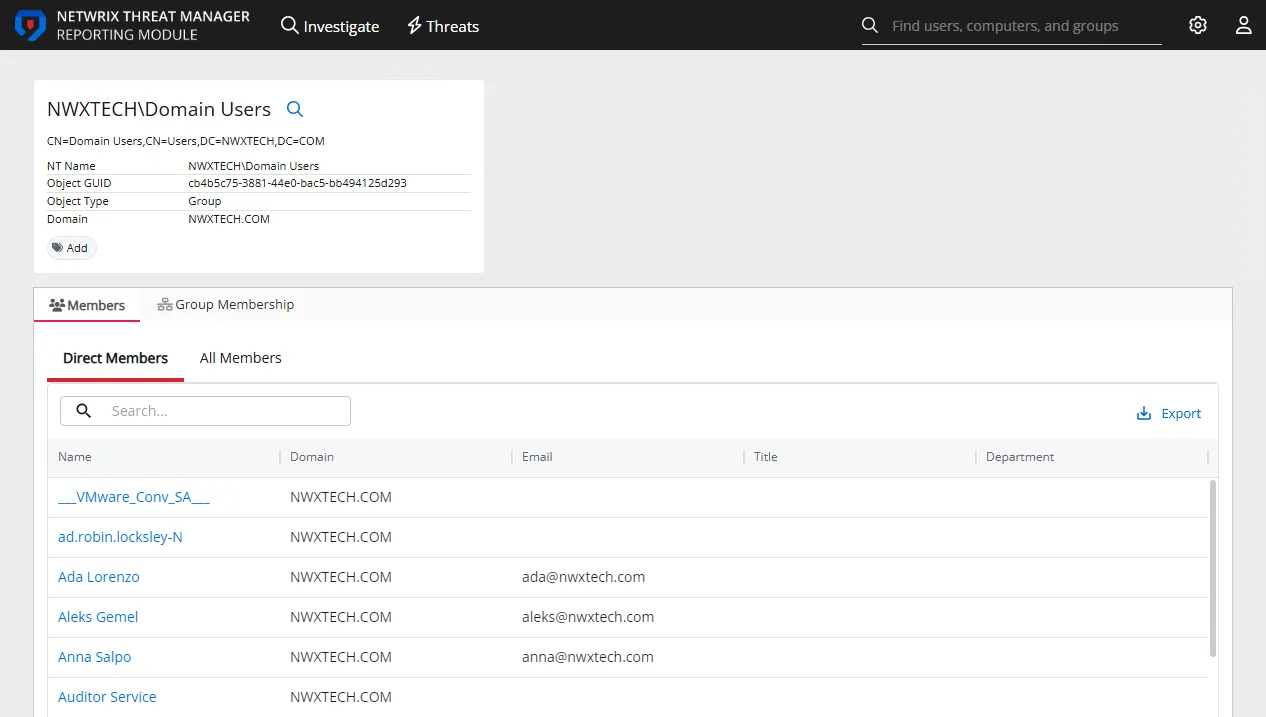
The top of the page displays a group profile card that may contain the following information about the group:
- Name
- DN
- NT Name (SAM Account Name)
- Object GUID
- Object Type
- Domain
- Tags, with an option to add additional tags
The Group Details page has the following tabs:
- Members tab
- Group Membership tab
Members Tab
On the Group Details page, the Members tab is displayed by default.
The Members tab displays information about the members of the group. It has two sub-tabs:
- Direct Members – Lists objects (such as users, computers, groups) who are direct members of the group
- All Members – Lists direct and indirect members of the group. Indirect members are those who are members of this group through nested groups
Each sub-tab displays a table with the following columns:
- Name – The display name of the member. Click the link to view object details.
- Domain – Name of the domain. This may be either the domain DNS name or domain controller hostname.
- Email – The email address of the member
- Title – user's title, as read from Active Directory
- Department – user's department, as read from Active Directory
Group Membership Tab
Click the Group Membership tab to open it.

The Group Membership tab displays the groups that the group is a member of. Here, 'the group' refers to the group whose details you are viewing.
The tab has two sub-tabs:
- Direct Member Of – Lists groups the group is a direct member of
- Indirect Member Of – Lists groups the group is a member of via membership in a nested group
Each sub-tab displays a table with the following columns:
- Name - The name of the group. Click the link to view group details.
- Domain - Name of the domain. This may be either the domain DNS name or domain controller hostname.
- Tags - The tag present on the perpetrator, file, or host associated with the event