Enrollment Secret Configuration Window
The Enrollment Secret is a limited-life (1 hour) password generated by the Enterprise Manager. The Agent Installer uses it to ensure that the Agent connects to a legitimate Enterprise Manager. It enables the automatic exchange of certificates between the Enterprise Manager and the Agent. How you apply the enrollment secret depends on the method you use to install the Agent.
- If you use the Administration Console to deploy the Agent, the console automatically generates and uses a new enrollment secret as part of automated Agent installation.
- If you install the Agent manually, enter the enrollment secret in the Certificates window of the Agent Setup wizard during installation. See the Manual Agent Deployment topic for additional information.
To generate the enrollment secret, complete the following steps:
Step 1 – Click Agents in the left pane to launch the Agents interface. Then click Agent Enrollment Secret to launch the Enrollment Secret Configuration window.
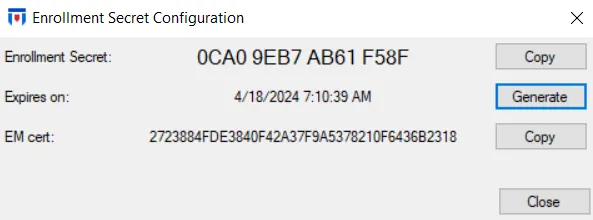
Use the Enrollment Secret Configuration window to generate the enrollment secret required to manually deploy the Agent. It has the following fields:
-
Enrollment Secret – A limited-life (1 hour) password generated by the Enterprise Manager. The Agent Installer uses it to ensure that the Agent connects to a legitimate Enterprise Manager.
-
Expires in – The expiration date timestamp for the enrollment secret
-
EM cert – The Enterprise Manager certificate generated by the certificate authority for use by the Enterprise Manager to establish trust between the Enterprise Manager and other modules including the Agent
- Note the value of the Enterprise Manager certificate (EM cert) and verify that it is the same value displayed in the Agent installer to ensure that the Agent is connecting to a legitimate Enterprise Manager.
Step 2 – Click Generate to generate an enrollment secret, which is valid for 1 hour.
- When you deploy the Agent from the Administration Console, Threat Prevention automatically creates a new enrollment secret, which invalidates any previous secret that hasn't expired.
- Click Copy to copy the enrollment secret and enter it in the Certificates window of the Agent Setup wizard during manual Agent installation.
Restarting the Enterprise Manager cancels the current enrollment secret.