Agent Safe Mode
To collect real-time activity data, the Agent hooks into (intercepts) specific Microsoft APIs in the LSASS process. Consider the following:
-
Occasionally a Microsoft Security Bulletin impacting LSASS can interfere with the Agent instrumentation resulting in LSASS shutting down. The Agent is configured to monitor for an LSASS process termination shortly after a server reboot. The LSASS Process Terminated alert (Operations alert) triggers in this event and the Agent stops. As a result, all monitoring/blocking by that Agent stops. To resolve the issue, either upgrade to the latest version of the Agent or upgrade SI.ActiveDirectoryMonitor.dll - commonly known as ADMonitor DLL (recommended). See the Upgrade ADMonitortopic for additional information.
infoActivate an email notification for the LSASS process terminated alert. See the Enable the 'LSASS Process Terminated' Email Alert topic for additional information.
-
In addition to the LSASS process termination check, you can configure the Agent for a Safe Mode. In Safe Mode, the Agent records the version of the LSASS DLLs that it hooks into during installation. When you restart an Agent, it compares the DLL versions with the recorded list. If the versions don't match, the Windows AD Events monitoring module doesn't load. The Agent’s status in the Agents interface changes to Active (Modules Pending), and all Active Directory monitoring/blocking by that Agent stops. The 'Agent Started in AD Monitor pending mode' alert (Operations alert) triggers in this event. To resolve the issue temporarily, the Threat Prevention administrator should start the pending modules. See the Start Pending Modules topic for additional information. Netwrix also recommends upgrading SI.ActiveDirectoryMonitor.dll (commonly known as ADMonitor DLL) to resolve the issue permanently. See the Upgrade ADMonitor topic for additional information.
infoActivate an email notification for this alert. See the Enable Agent Started in AD Monitor Pending Mode Email Alert topic for additional information.
In Safe Mode, Threat Prevention prevents only the Active Directory monitoring/blocking module from loading on the Agent machine every time key LSASS DLLs change. The LSASS process keeps running.
Most Microsoft Security Bulletins that alter LSASS will not interfere with Agent instrumentation.
Active Directory monitoring/blocking doesn't resume until you start the pending modules. To determine whether the LSASS changes conflict with the Agent instrumentation, start the pending modules on one domain controller (see the Start Pending Modules topic). If there are no issues after five minutes, the changes are unlikely to conflict with the Agent instrumentation. If you have any concerns about the changes, contact Netwrix Support for more information. Netwrix tests Microsoft Security Bulletins affecting LSASS before they become public and notifies Threat Prevention users when it identifies an issue.
When you start the pending modules, the Agent overwrites the recorded versions of the LSASS DLLs it hooks into with the current versions.
Enable Agent Started in AD Monitor Pending Mode Email Alert
To enable email notifications for the Agent Started in AD Monitor pending mode Operations alert:
These steps require the Threat Prevention administrator role. They also assume that you have configured the System Alerting Window and enabled email alerts.
Step 1 – Clck Configuration > Alerts on the menu. The Netwrix Threat Prevention System Alerting window opens.
Step 2 – On the Email tab, click Configure.
Step 3 – Create a message profile for the Safe Mode notification with the recipients you want to notify when the AD modules are pending. See the Create Message Profiles topic for additional information.
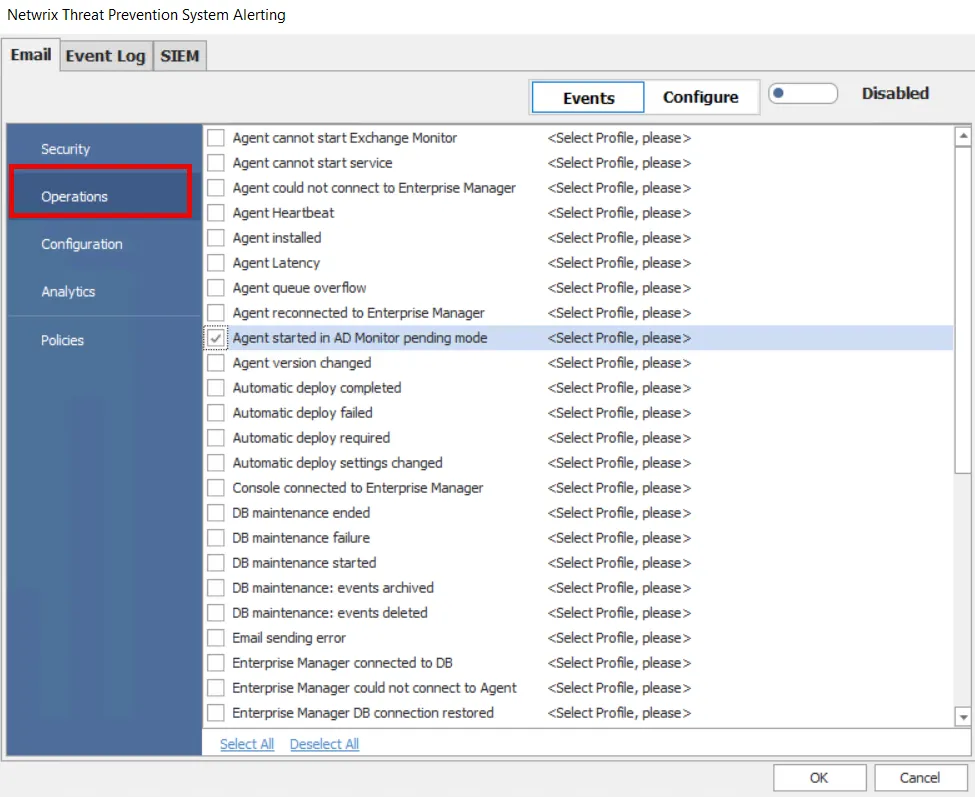
Step 4 – Select Events, and then Operations on the left. Check the Agent Started in AD Monitor pending mode event alert and select the message profile you created in Step 3 from the dropdown menu to assign it to the alert. See the Email Tab topic for additional information.
Step 5 – Ensure that the email alerts are Enabled and click OK.
When the Agent Started in AD Monitor pending mode event alert triggers, Threat Prevention sends an email notification to the recipients in the selected message profile.