Forged PAC Analytic Type
The Forged Privilege Account Certificate (PAC) analytic type identifies Kerberos tickets with a modified PAC. By manipulating the PAC, a field in the Kerberos ticket that contains a user’s authorization data (in Active Directory, this is group membership), an attacker can grant themselves elevated privileges.
| Forged PAC | |
|---|---|
| Definition | Kerberos tickets with modified Privilege Account Certificate (PAC) |
| Example | Kerberos tickets are used as a sort of “pass card” to obtain access to resources. Once a domain controller authenticates a user, a TGT (ticket granting ticket) is granted with a limited lifespan. This is then used to obtain TGS (ticket granting service) and the TGS is what identifies a user to a resource on the network. A known vulnerability exists where PAC part of a ticket can be modified to include groups the user isn't a member of. If a user on the network were to attempt to use such a ticket, this analytic would detect the altered ticket and generate an alert. |
| Trigger | PAC of the ticket contains RIDs that aren't TokenGroups attribute. |
| Recommended Settings | No additional configuration needed |
Analytic Workflow
- Configure the analytic policy
- Enable the analytic policy
- Enable alerting on incidents through the System Alerting Window.
See the Forged PAC Analytic Data Grid topic for information on event data collected per incident.
Configure Forged PAC Analytic Policy
Open the Forged PAC Analytic Policy in any of the following ways:
- Click Analytics in the left pane to launch the Analytics interface. Then click the gear icon for the analytic.
- Expand the Analytics node and click the analytic you want. On the analytic window, click the gear icon available in the top right corner.
The Configure Analytics window has two tabs:
- Settings – Where you define the analytic trigger
- Policy – Where you add filters, configure additional actions, set a custom schedule, and enable the policy
Settings Tab

The Forged PAC analytic monitors for when the user isn't a member of a group listed in the PAC section of the user’s Kerberos ticket. You can scope this analytic to monitor specific groups. To reduce the number of false positives, Threat Prevention only checks for a mismatch of sensitive groups you specify on the Settings tab.
You can select specific RIDs that Threat Prevention compares against the PAC and user’s access token for a mismatch to trigger the incident.
- Click the Add (+) button to open the Select AD Groups Window, where you can select the Active Directory groups you want. On selection, Threat Prevention monitors the RID of that group for modifications.
- The Remove (x) button removes the selected items from the incident criteria.
Policy Tab
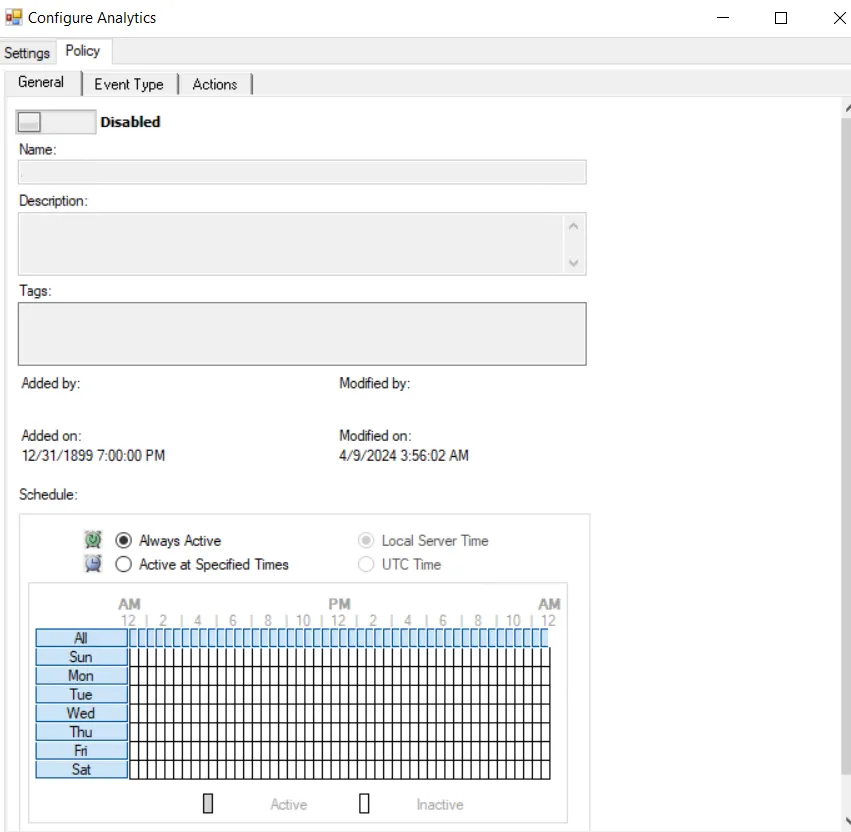
The Policy tab for configuring analytics consists of three sub-tabs:
-
General tab – Configured the same way a regular policy’s General Tab is configured. The only exception is that the Name and Description are hard coded, and can't be modified. The Tags field is disabled for analytics.
-
Event Type tab – Configured the same way a regular policy’s Event Type Tab is configured. The only exception is that the Authentication Monitoring Event Type is hard coded, and the Success filter can't be modified.
-
Scope the servers to include in or exclude from monitoring on the IP Addresses (from) filter, the IP Addresses (to) filter, the Hosts (from) filter, or the Hosts (to) filter.
noteSome authentication events may return only a host name (NetBIOS or FQDN), others may return only an IP address. Take this into account when entering filter values.
-
Alternatively: Scope the domains to include in or exclude from monitoring on the Domains/Servers filter.
-
Optional: Scope the protocol to monitor on the Authentication Protocol filter. If you enable the analytic on a domain controller, also scope the login type. The Authentication Protocol filter is hard coded to ensure that Threat Prevention monitors the Kerberos protocol.
noteThe Exclude failed authentications with ‘N-2’ passwords option requires a GPO within the organization configured to ‘Enforce password history’ with a setting of a minimum of ‘3 passwords remembered’. Otherwise, the option has no effect.
-
Optional: Scope the accounts to include in or exclude from monitoring on the AD Perpetrator filter.
-
-
Actions tab – Configured the same way a regular policy’s Actions Tab is configured. The only exceptions are that the “Send to Event DB” and “Email Notifications” options are disabled. Analytic policies store the event data they collect in memory until an incident triggers. Use caution with the “Send Raw Data to SIEM” option, as it sends all event data rather than the triggered incident, which could be a large volume of data. To send notifications on incidents, use the System Alerting Window to configure Email and SIEM alerts.
Forged PAC Analytic Data Grid
The data grid on the Forged PAC node lists one row per incident identified.
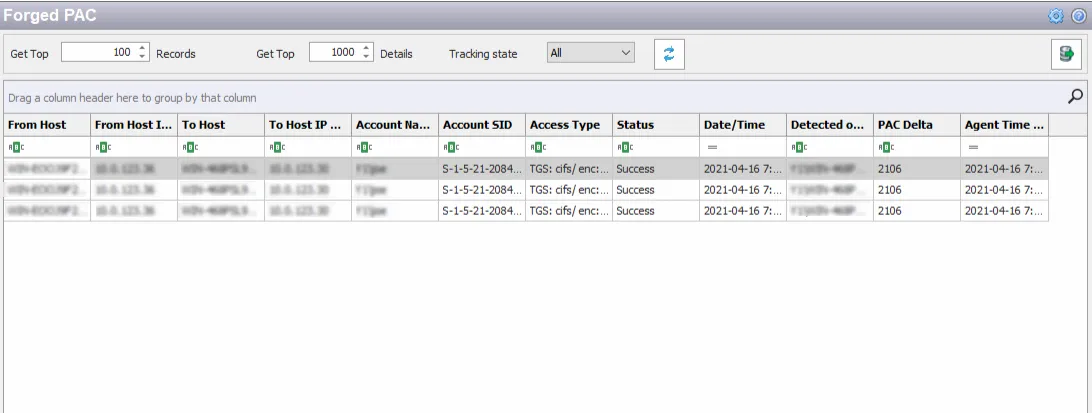
You can filter the data grid according to the Event Tracker status: All, New, or Reviewed. See the Event Tracker Window topic for additional information.
The top data grid includes the following information for each incident:
- From Host – Name of the originating host
- From Host IP Address – IP address of the originating host
- To Host – Name of the target host
- To Host IP Address –IP address of the target host
- Account Name – Security principal of the account that triggered the incident
- Account SID – Security Identifier of the account used in the incident-triggering event
- Access Type – Type of authentication with encryption, e.g. TGS: cifs/ enc:23/18, TGS: krbtgt/ enc: 23/18, etc.
- Status – Indication of whether the authentication was successful
- Date/Time – Date timestamp of the monitored event. Hover over the data in this column to view the local time (of the Enterprise Manager) and UTC time simultaneously.
- Detected on DC – Fully-qualified name of the domain controller that detected the event
- PAC Delta – RID for the group that doesn't have access
- Agent Time Logged – Timestamp for when the Agent detected the event. This can be different from the Enterprise Manager time (displayed in the Date/Time column) due to latency.
This data grid employs features for sorting, filtering, searching, and more. See the Data Grid Functionality topic for additional information.