Schedule Database Maintenance
You must schedule the database maintenance job, which runs the specified operation on each of the enabled event type data, analytic data, and/or policy data older than a specific period. You can run this job once now, schedule it to run once at a later time, or schedule it to run on a regular rotation.
To configure a schedule:
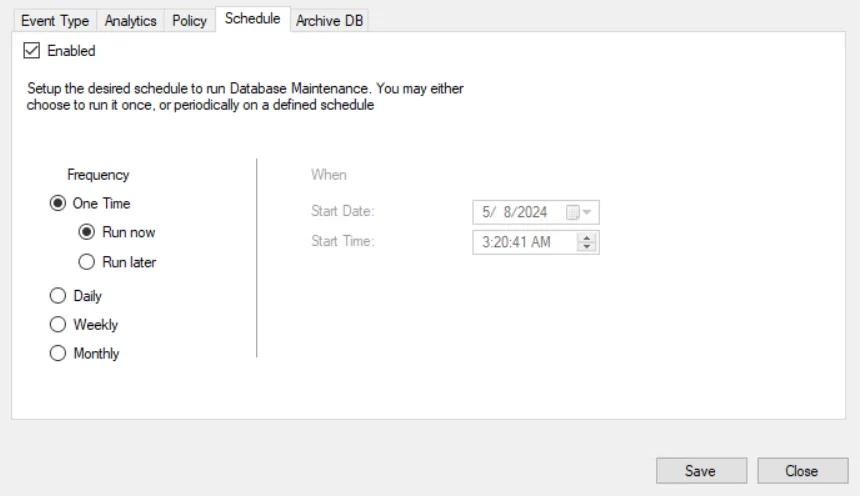
Step 1 – Click Configuration > Database > Maintenance on the menu. The Database Maintenance window opens.
Step 1 – Click the Schedule tab.
Step 1 – Check the Enabled box.
Step 2 – Select a frequency to run the database maintenance job:
- One Time: Run now – Runs the database maintenance job once when you save the configurations on the Database Maintenance window
- One Time: Run later – Runs the database maintenance job once according to the Start Date and Start Time set
- Daily – Runs the database maintenance job once a day according to the Start Date and Start Time set
- Weekly – Runs the database maintenance job once a week according to the Day Of Week, Start Date, and Start Time set
- Monthly – Runs the database maintenance job once a month according to the Day of Month, Start Date, and Start Time set
Step 3 – Set the options under When for the selected frequency.
- Start Date
- Start Time
- Day of Week (if applicable)
- Day of Month (if applicable)
Step 4 – Click Save to save the settings.
The database maintenance job now runs at the configured time and day. The job runs all tasks enabled at the time it runs.
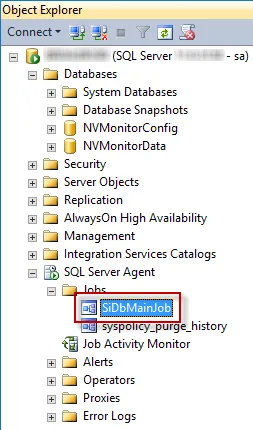
You can view this scheduled job in Microsoft SQL Server Management Studio in the SQL Server Agent > Jobs folder (SiDbMainJob).