AD Replication Lockdown Event Type
The primary use case of the AD Replication Lockdown event type is to prevent non-domain controllers from using replication APIs. Each blocked replication attempt results in an event with details. Make sure the policy has a ‘white list’ of ‘allowed/known good’ domain controllers so that the policy doesn't block legitimate replication.
The event filters for the AD Replication Lockdown event type are:
- AD Perpetrator
- Permissions
- Domains/Servers
- Hosts (from)
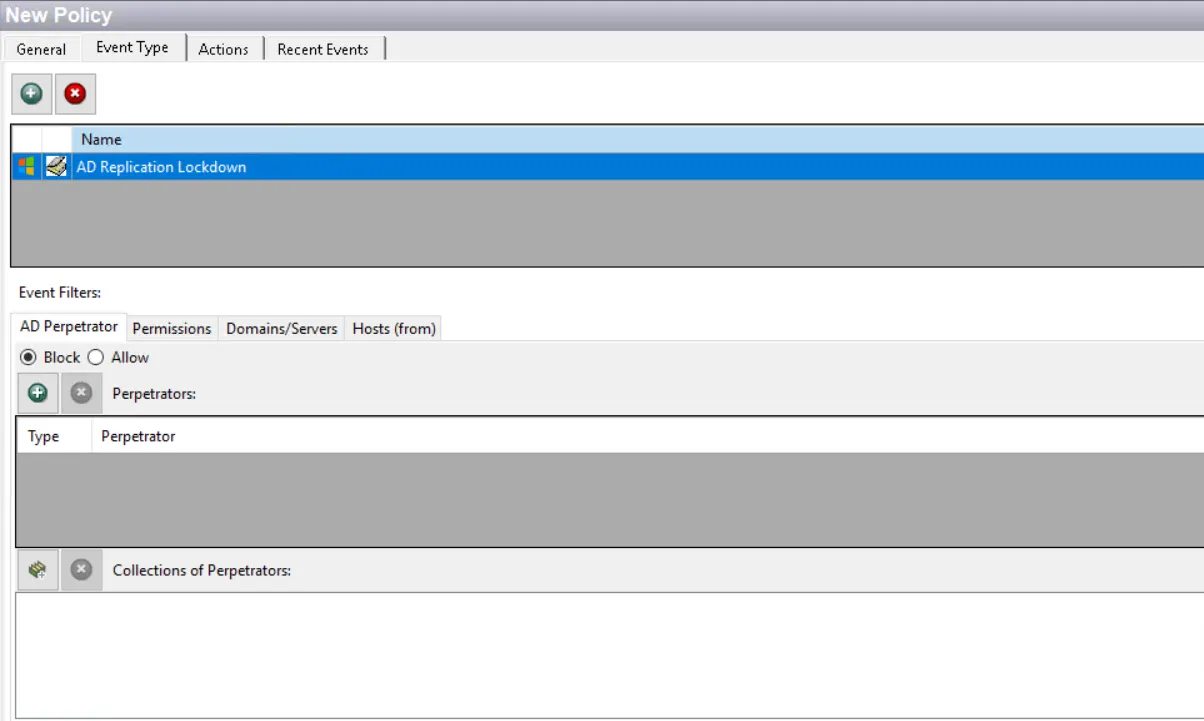
Each filter tab acts like an "AND" statement for the filter. Threat Prevention treats any filter tab left blank like an "ALL" for that filter set.
Lockdown/blocking policies with blank filters lock down or block everything.
Since Windows can't detect if a sync request is coming from a legitimate domain controller, this event type blocks requests from computers that the policy doesn't ‘allow’.
You must identify legitimate domain controllers in the event filters. Use one of the following methods:
-
AD Perpetrator filter
- Use this filter for a dynamic list of domain controllers
- Set the filter to "Allow"
- Add the Users OU > Domain Controllers group
- Add any other groups containing domain controllers. It triggers an error message reminding the user that only domain controllers should be allowed.
- The policy blocks any domain controller not included in these groups from syncing/replication
-
Domains/Servers filter
- Use this filter for a static list of domain controllers
- Add domain controllers to the Exclude list
- The policy blocks any domain controller you don't exclude from syncing/replication
Not allowing ALL domain controllers to sync has negative impacts on Active Directory.
If you apply no filters, saving the policy configuration displays a warning message.
The AD Replication Lockdown event type internally looks for use of the GetNCChanges() API and blocks the API call when a machine outside the scope of the policy filters invokes it.
AD Perpetrator Filter
Use the AD Perpetrator filter for lockdown to set the scope of the policy to lockdown specific security principals committing changes or to exclude specific security principals committing changes from lockdown.

Select the Block or Allow option button and then edit the list.
For the Password Enforcement Event Type, selecting Allow means that this policy doesn't validate the new passwords for the accounts listed here. Selecting Block means that this policy validates the new passwords for the accounts listed here.
Use the buttons in the Perpetrators and Collections of Perpetrators areas to edit the lists.
- Perpetrators area – The Add (+) button opens the Select Active Directory Perpetrators Window.
- Collections of Perpetrators area - The Collection button opens the List of Collections Window to the appropriate Collection category.
- The Remove (x) button deletes the selected items from that box.
To enable a Dynamic Policy, use the Collection button to select the applicable Dynamic Collection. See the Dynamic Collections topic for additional information.
Permissions Filter
Use the Permissions filter to set the scope of the policy for specific replication permissions within Active Directory that are used to dump password hashes as a fake domain controller in a DCSync/Replication attack.
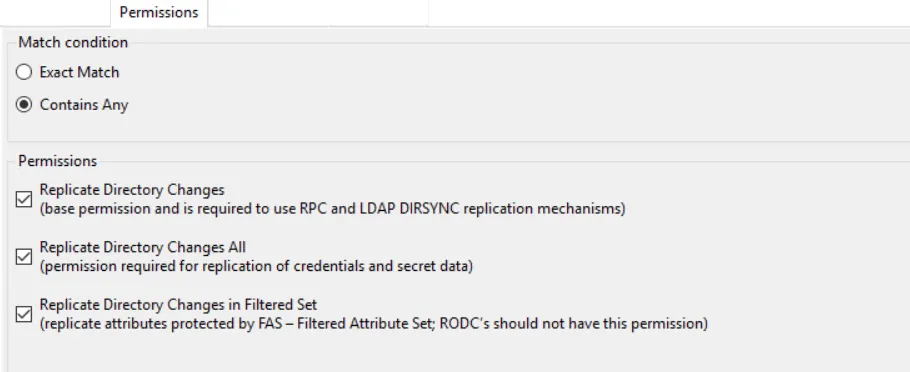
The Permissions filter has two sections:
-
Match condition – Capture the event if the replication request has either the exact permissions specified or has any of the permissions specified.
-
Permissions – Permission level associated with the replication request:
- Replicate Directory Changes – Base permission and is required to use RPC and LDAP DIRSYNC replication mechanisms
- Replicate Directory Changes All – Permission required for replication of credentials and secret data
- Replicate Directory Changes in Filtered Set – Replicates attributes protected by filtered attribute sets (FAS). Read-only Domain Controllers (RODCs) shouldn't have this permission.
Domains/Servers Filter
Use the Domains/Servers filter to set the scope of the policy to specific domains and/or servers or to exclude specific domains and/or servers.

Use the buttons in the Include and Exclude areas to edit the lists.
- The Add (+) buttons open the Select Domains and Servers Window.
- The Collection button opens the List of Collections Window to the appropriate Collection category.
- The Remove (x) button deletes the selected items from that box.
To enable a Dynamic Policy, use the Collection button to select the applicable Dynamic Collection. See the Dynamic Collections topic for additional information.
Hosts (from) Filter
Use the Hosts (from) filter for the AD Replication Lockdown event type to set the scope of the policy to only lockdown specific hosts as originators of an event.

Select the Block or Allow option button and then edit the list.
Use the buttons in the Include Hosts and Include Collections areas to edit the lists.
- The Hosts Add (+) button opens the Select Computer Window.
- The Collection button opens the List of Collections Window to the appropriate Collection category.
- The Remove (x) button deletes the selected items from that box.
To enable a Dynamic Policy, use the Collection button to select the applicable Dynamic Collection. See the Dynamic Collections topic for additional information.