Event Type Tab
Use the Event Type tab to define the objects and events that Threat Prevention monitors/blocks.
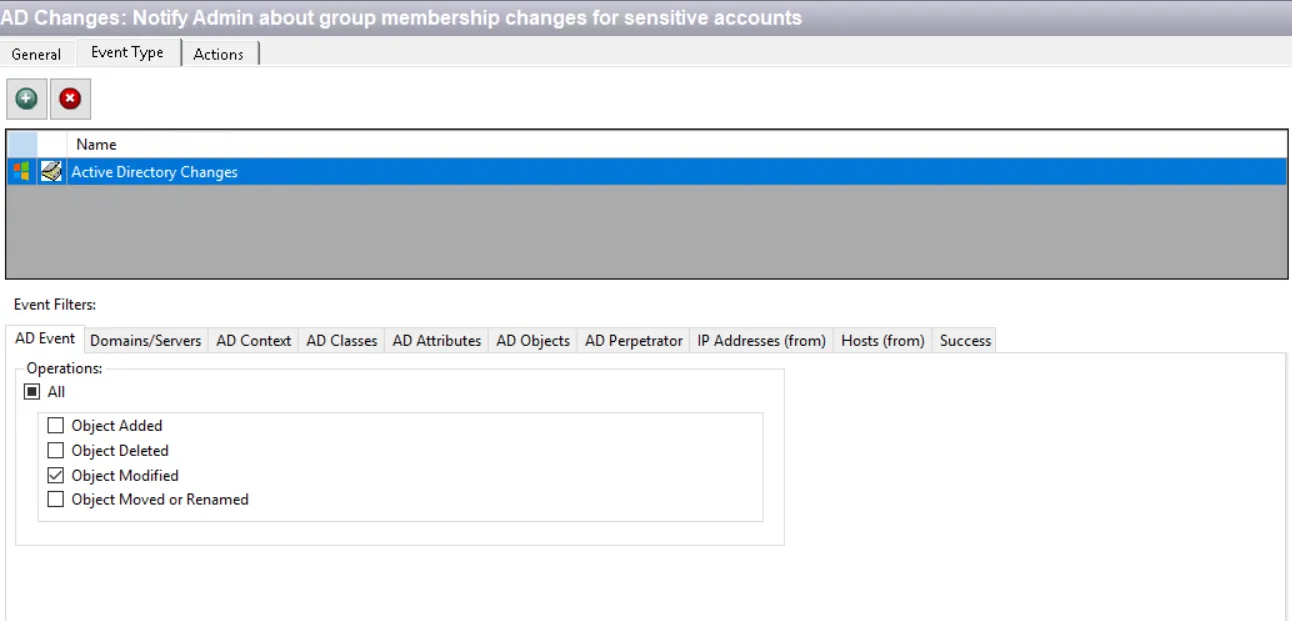
Each event type represents what Threat Prevention monitors or blocks. Use event filters to narrow or broaden the scope of the monitoring/blocking. Click Add (+) to open the Event Selection window. Your licensed modules determine what event types are available. Event types that aren't available or not licensed are grayed-out but visible in the Event Selection window. See the License Manager Window topic for information.
Event Selection Window
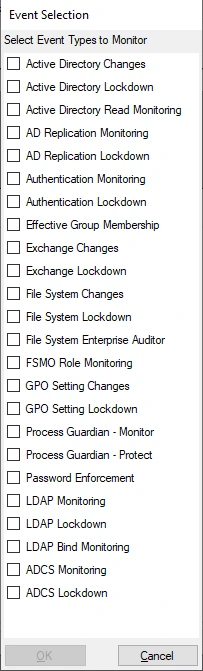
Check the box for the event type you want and click OK. The corresponding event filters show at the bottom of the Event Type tab. You can assign multiple event types to a policy.
Create different policies for different event types for reporting purposes. Otherwise, one report has a mix of different types of data. There are a few exceptions to this feature.
After you select the event type for the policy to monitor, use the filters to scope the policy.
Each filter tab acts like an "AND" statement for the filter. Threat Prevention treats any filter tab left blank like an "ALL" for that filter set.
Save all changes you make to a policy or a template before leaving the configuration interface.
See the following topics for additional details:
- Active Directory Changes Event Type
- Active Directory Lockdown Event Type
- Active Directory Read Monitoring Event Type
- AD Replication Monitoring Event Type
- AD Replication Lockdown Event Type
- Authentication Monitoring Event Type
- Authentication Lockdown Event Type
- Effective Group Membership Event Type
- Exchange Changes Event Type
- Exchange Lockdown Event Type
- File System Changes Event Type
- File System Lockdown Event Type
- File System Enterprise Auditor Event Type
- FSMO Role Monitoring Event Type
- GPO Setting Changes Event Type
- GPO Setting Lockdown Event Type
- Process Guardian – Monitor Event Type
- Process Guardian – Protect Event Type
- Password Enforcement Event Type
- LDAP Monitoring Event Type
- LDAP Lockdown Event Type
- LDAP Bind Monitoring Event Type
- ADCS Monitoring Event Type
- ADCS Lockdown Event Type
Event Filters Overview
Scope policies using the Event Filters tabs ascribed to the policy on the basis of the event type you selected on the Event Selection Window.
The filters appear on the Event Type tab when you select an event type.
Several filters let you set both an Include and an Exclude list together. The Exclude list takes precedence over the Include list. If an item is part of both lists, Threat Prevention excludes an event that comes through with that item.
When using a Lockdown Event Type, decide between Block or Allow for the filter.
- Block – Blocks all items added to the list, or if the list is left blank, it blocks all items for that filter category
- Allow – Only allows items added to the list and blocks all others. If the list is left blank, it allows all items for that filter category.