Export Policies and Templates Window
You may need to export collections, policies, and templates from the Administration Console and them import them back for certain reasons, such as during a reinstall. The Export Policies and Templates Window exports these items to an XML file.
To export policies and templates:
Step 1 – Open the Export Policies and Templates Window in several ways.
- If you open it through Tools > Export on the menu, it exports everything.
- If you open it via the keyboard shortcut (Alt+X) on the Policies Interface or Templates Interface, it exports only what is within the selection.
- To export only a single policy or template, use the Export option on the right-click menu. See the Export Policies and Templates Window topic for additional information.
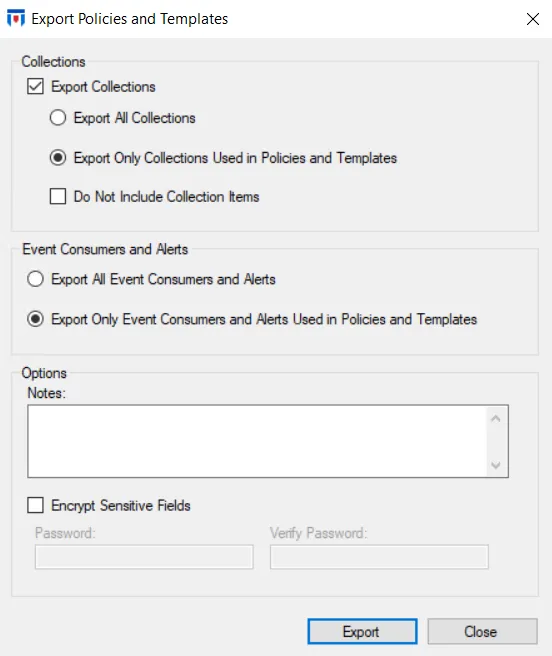
Step 2 – The Export Policies and Templates window includes the following options.
- Collections
- Export Collections – Check the box to enable the option buttons:
- Export All Collections
- Export Only Collections Used in Policies and Templates
- Don't Include Collection Items checkbox – Excludes collection items from the Collection export
- Export Collections – Check the box to enable the option buttons:
- Event Consumers and Alerts
- Export All Event Consumers and Alerts – Exports all event consumers (actions) and alerts
- Export Only Event Consumers and Alerts Used in Policies and Templates – Exports only event consumers (actions) and alerts configured on the Actions Tab of enabled policies
- Options:
- Notes – Enter any information you want to save with the XML file
- Encrypt Sensitive Fields – When this checkbox is checked, it enables the Password and Verify Password boxes where you can enter a password to use as the encryption key
Step 3 – After you set the options as desired, click Export.
Threat Prevention creates a file that contains policy, template, and collection information as per the configured settings. See the Import Window topic to import this file.
The exported file is also the input for the Policy Verifier tool, which reports the file system paths and Active Directory objects that policies reference but that no longer exist. See the Policy Verifier Tool topic for additional information.